Approvals, compliance and the edit window
How the PoultryOS poultry ERP decides whose daily entry in the farm app waits for a check, how long an entry stays open to correction, and how the Compliance page shows an owner in five tiles who has not done the day's work.
PoultryOS Team · Product and implementation team
The previous post followed one daily entry from the shed to the server. This one follows it one step further, to the people who have to trust it. An integrator in contract broiler farming with fifteen open batches cannot visit fifteen sheds a day, so the question is never just “was the entry made?” but “was it made on time, at the farm, by the right person, and has anybody looked at it?”
PoultryOS, the poultry ERP behind the farm app and the owner portal, answers that with three rules and one page. The rules are approval, the edit window and the geofence, and the owner switches each of them on or off. The page is Compliance, which turns the discipline of the whole organisation into five numbers. The example below is the sample organisation, Shree Agro Integration, on Tuesday 27 October, with fifteen open Broiler batches.
Three switches the owner controls
Everything starts on the Settings page of the owner portal, which only the Owner can change; a Manager sees it read-only. The Features tab holds the switches that change how an entry is treated.
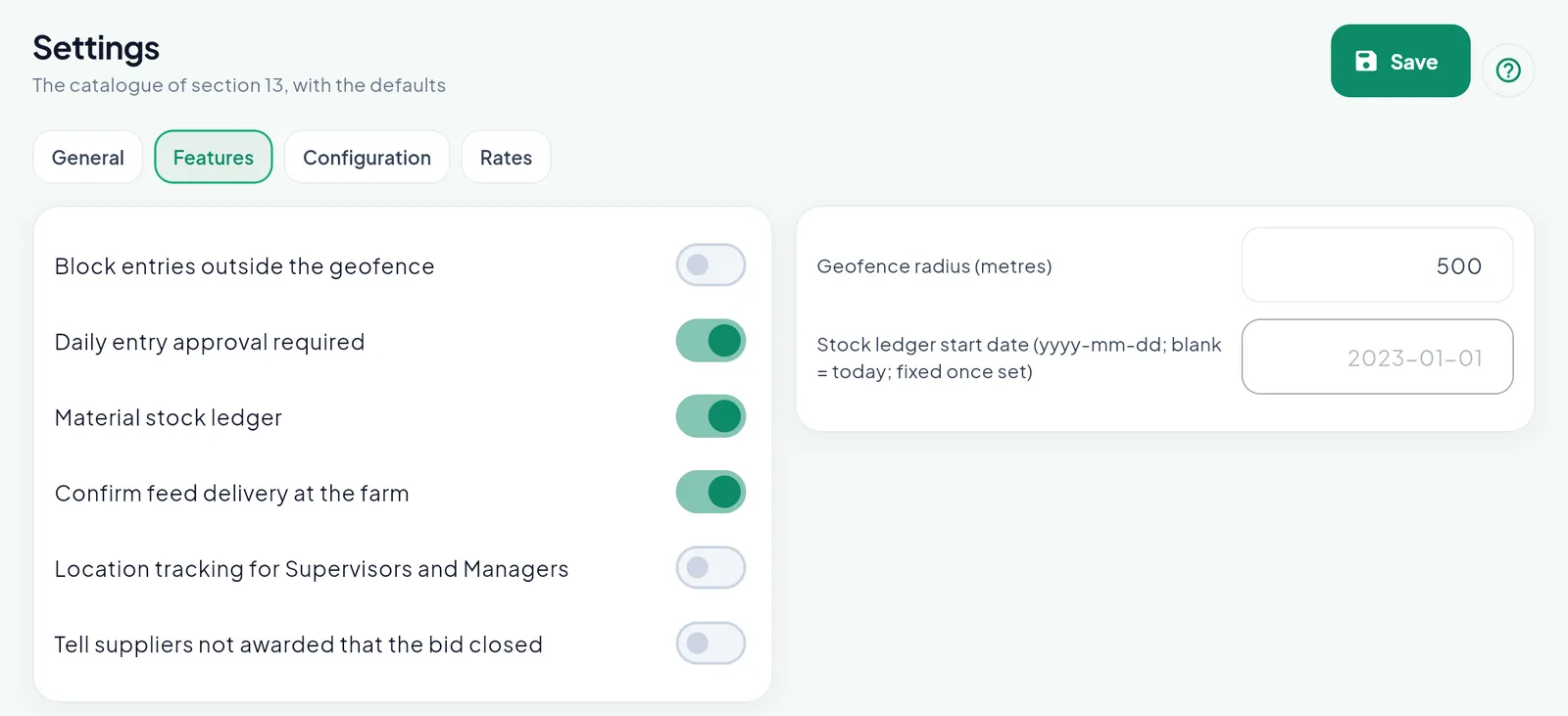
Shree Agro has approval on and the geofence block off. The radius stays at the default 500 metres.
Daily entry approval required. Off by default. When it is on, an entry saved by a Supervisor or a Contract Farmer waits for a check. An entry saved by the Owner or a Manager is approved at once, because they are the people who would approve it.
Block entries outside the geofence. Off by default. The app always reads the position of the phone at Save and compares it with the farm. With the block off, an entry from outside the radius is saved and marked “Outside the farm”. With the block on, it is refused. A farm can carry its own radius in place of the 500-metre default, and a farm without a position never blocks anyone.
The edit window sits on the Configuration tab, three days by default. Within it the people of the farm can open an entry and correct it. After it only the Owner or a Manager can.
One Save button keeps all four tabs, and the app follows at once: the next entry a supervisor saves already waits.
The farm supervisor app: an entry that waits
Amol Jagtap is a supervisor with six of the fifteen batches. His home shows only his farms: three of the six still have no entry today, and 14 birds have died so far across them.
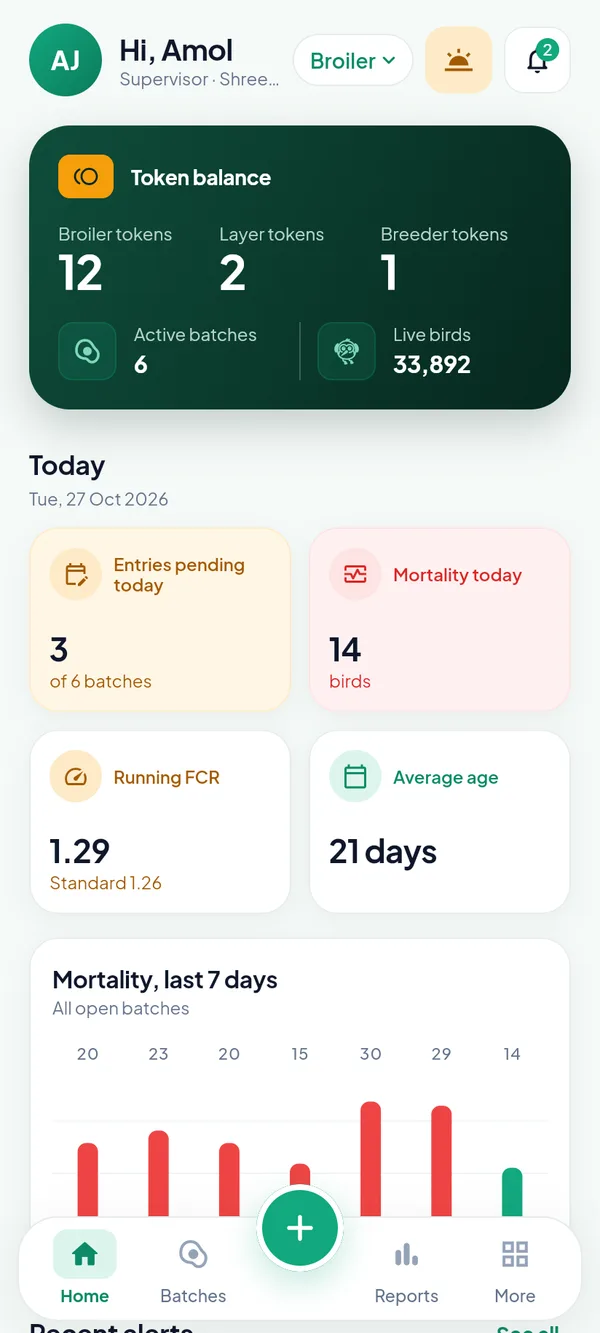
A supervisor sees the batches assigned, not the whole organisation.
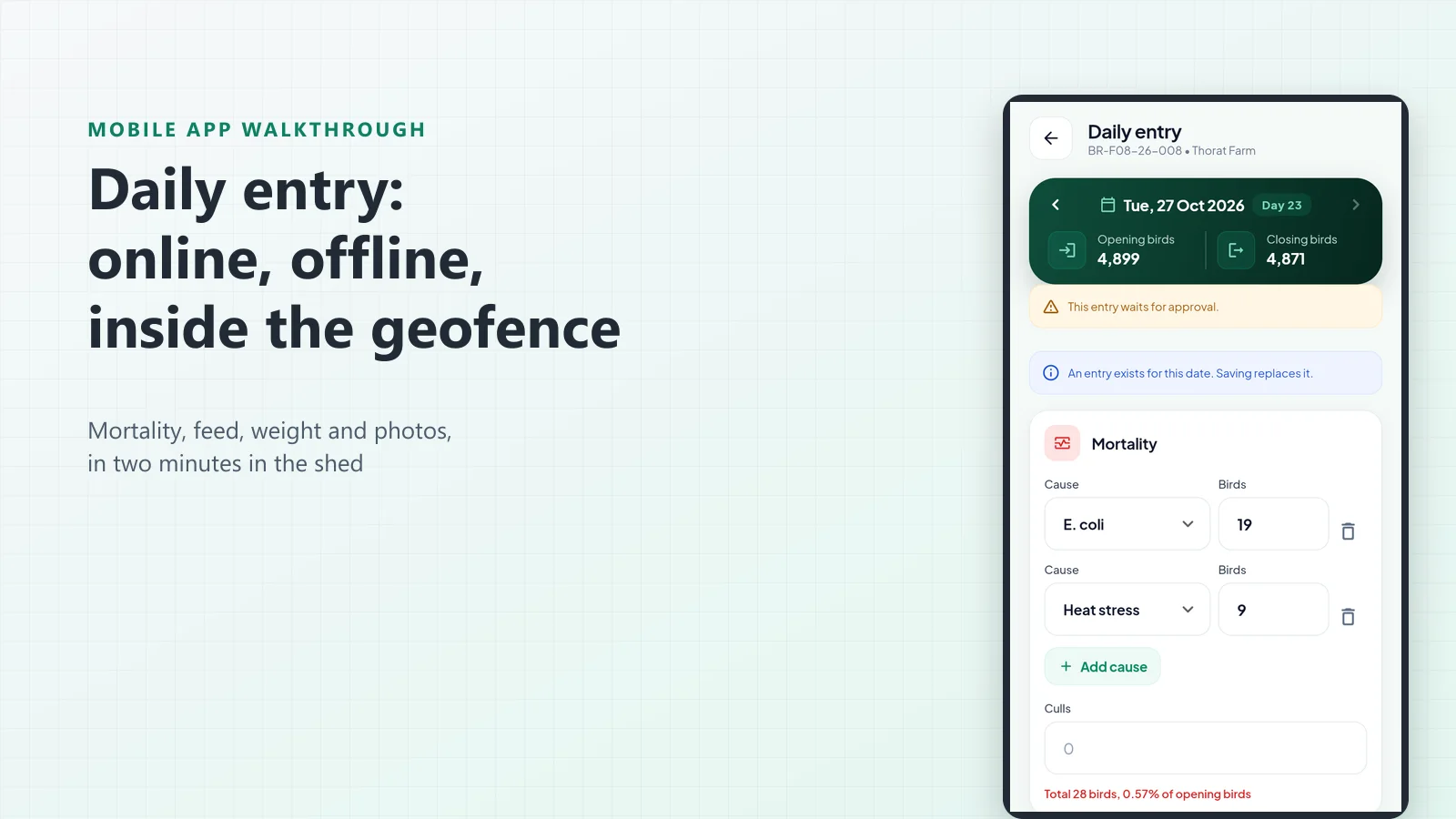
On Thorat Farm, batch BR-F08-26-008, day 23 has been entered: 4,899 opening birds, 28 dead, 4,871 closing. Because approval is on and the farm is a contract farm, the entry carries an amber line the moment it is saved: “This entry waits for approval.” Opened again the same day, it also says that saving replaces the entry of this date.
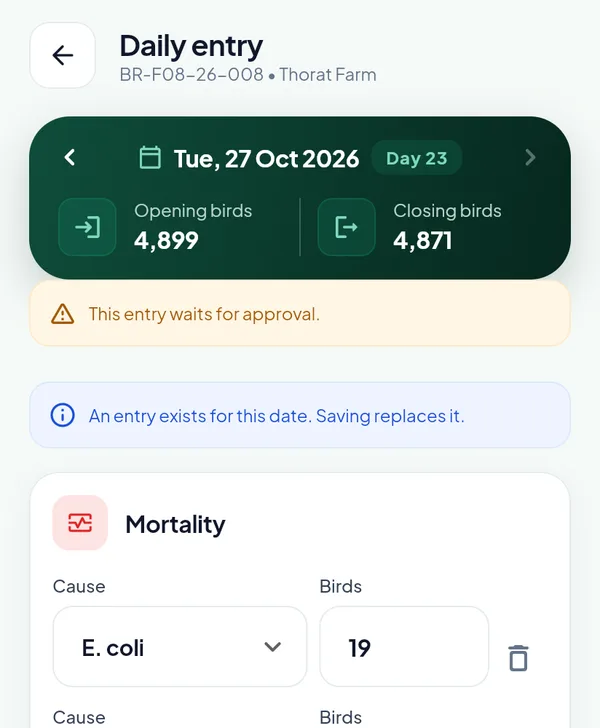
The farmer and the supervisor see the same warning, so nobody believes a number is final when it is not.
If the supervisor spots a mistake, say 9 heat-stress deaths that were really 6, they open the day, change it and save. Inside the edit window that is allowed, and the corrected entry simply waits again. The old figures are not lost: the record keeps who changed the entry, when, and every figure before and after.
The approver’s side: one alert per batch
The person who approves does not hunt for entries. Each batch with an entry waiting sends one alert. On the owner’s phone that morning, three Broiler batches are waiting: Pawar Farm (BR-F02-26-002), Kale Farm (BR-F06-26-006) and Thorat Farm (BR-F08-26-008), with a Layer unit as the fourth.
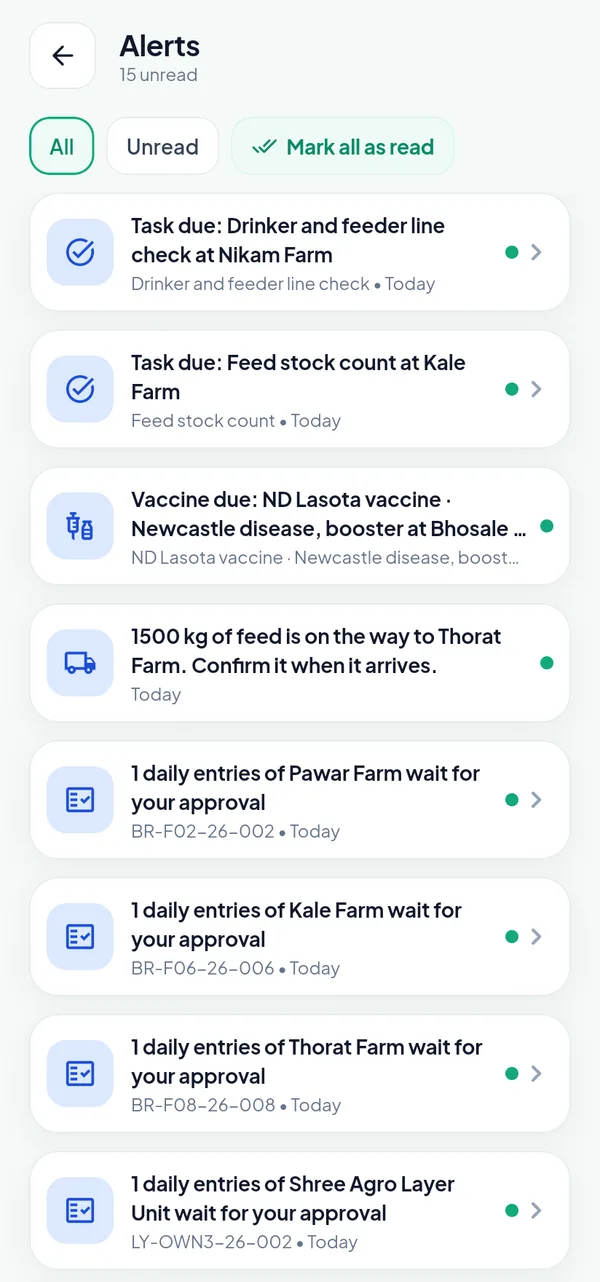
An approval alert opens the batch. It goes away by itself once the day is approved.
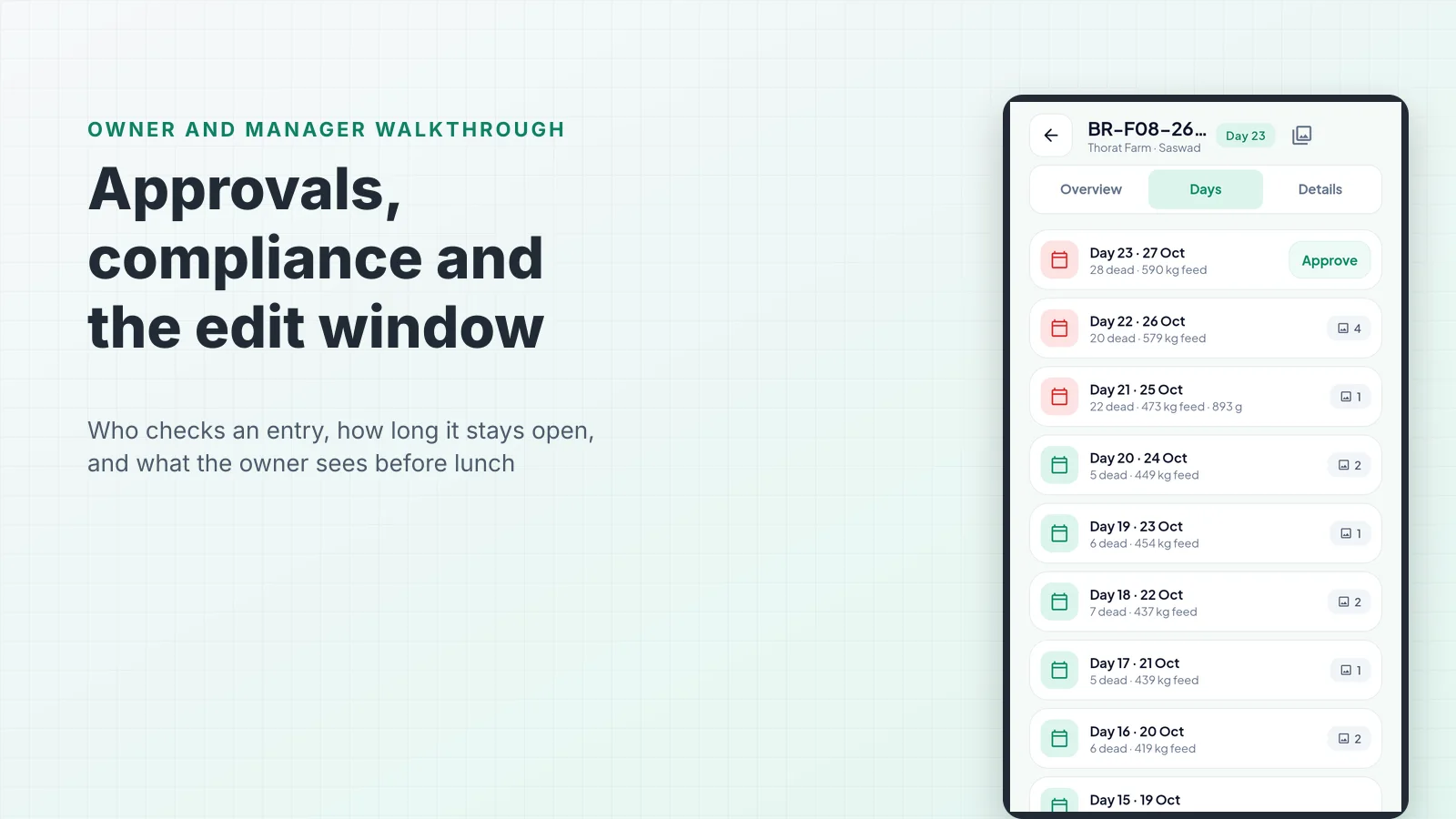
Tapping the Thorat Farm alert opens the batch on the Days tab. Day 23 shows Approve to the Owner and the Manager; the other days, already checked, show only their photo counts. Tapping it is the whole approval. To change the day first, tap the day, edit and save, and approve it afterwards.
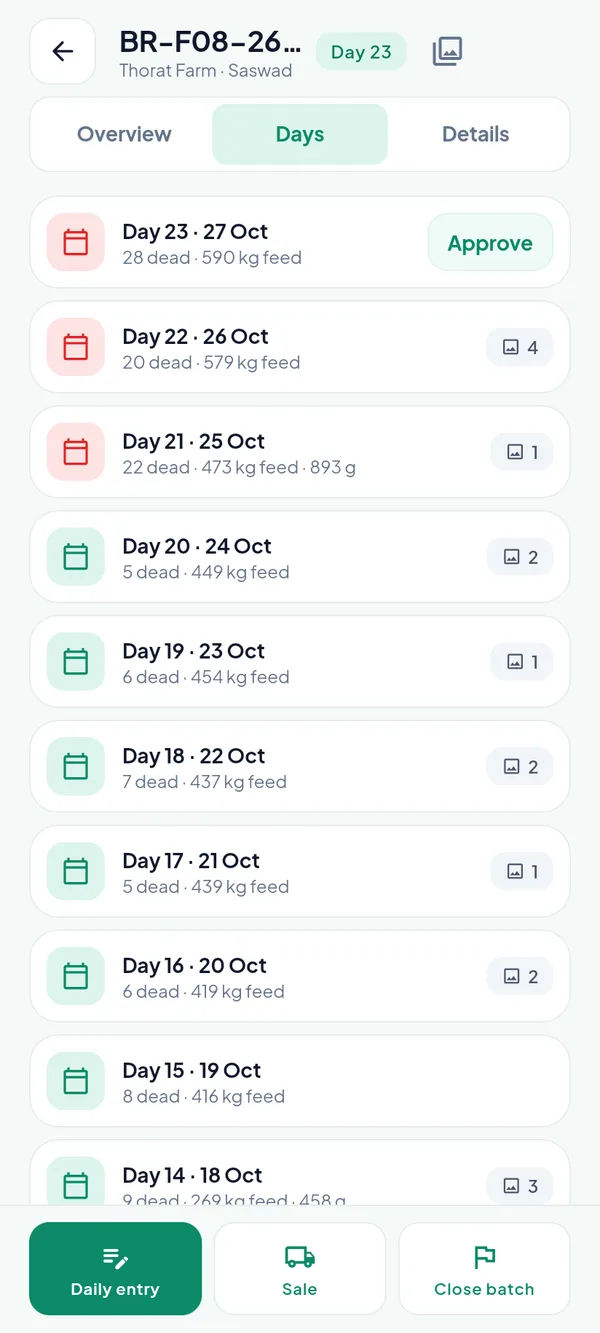
Days 21 to 23 carry the red calendar of high mortality. Only day 23 still waits.
Who may approve follows the roles. The Owner or a Manager approves any entry. A Supervisor approves the entries of the contract farmers on their farms, which lets an integrator push the first check down to the field when the farmers enter the day themselves.
Waiting is not invisible
The most common objection to approvals is that the owner then looks at stale numbers until somebody gets round to clicking. PoultryOS does not work that way. The figures of a waiting entry count in the KPIs at once; only the day register marks them as waiting.
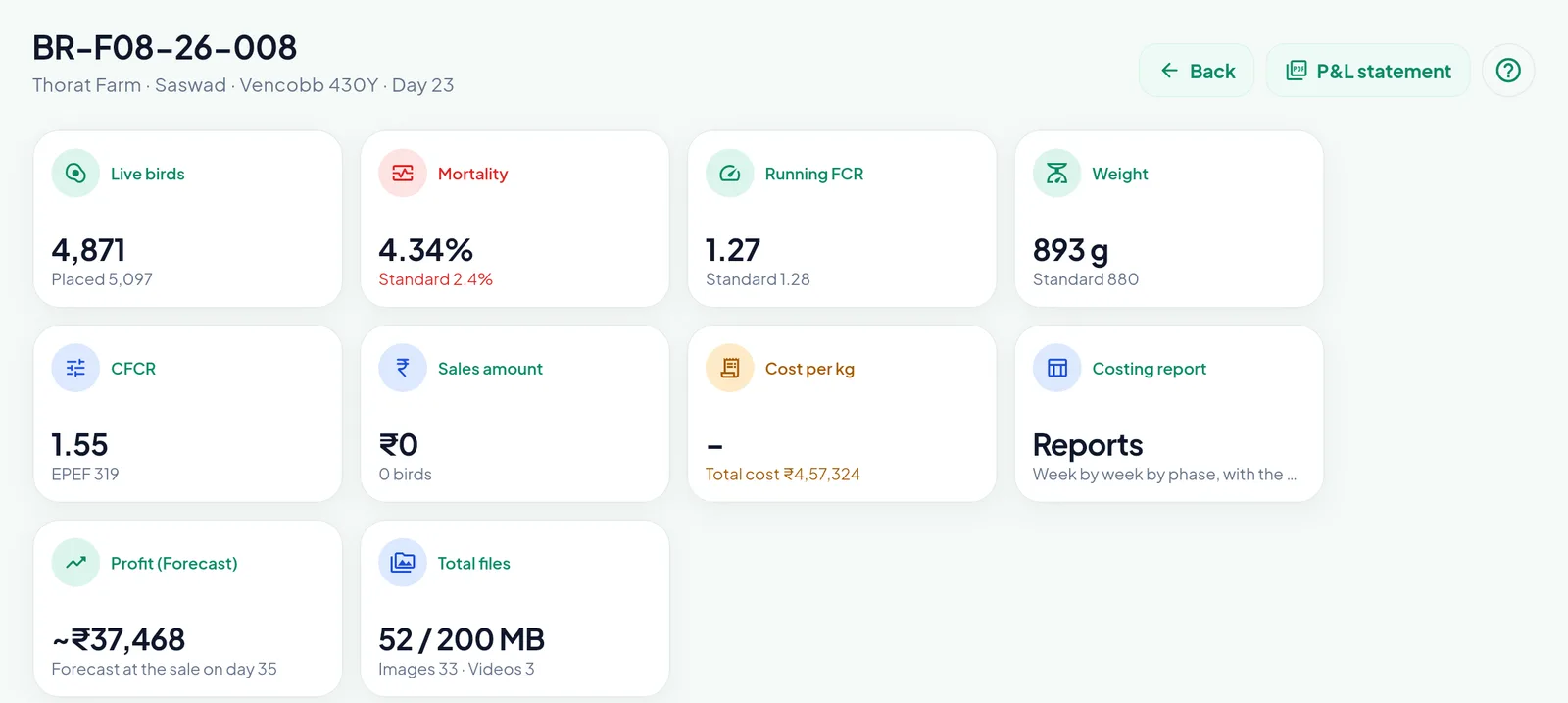
The portal already shows 4,871 live birds, which is the closing figure of the day that still waits.
So the 28 deaths of day 23 are already in the 4.34 % mortality on the batch page, and in the high-mortality alert, before anyone approves them. Approval is a check on the record, not a gate on the information. Further down the same page, the daily register has an Approval column and a Changes column; a row with changes opens the record of what changed, figure by figure.
The Compliance page: five tiles
The Owner and the Manager read the discipline of the organisation on Compliance in the portal. Priya Kulkarni, the manager, opens it at the start of the day.
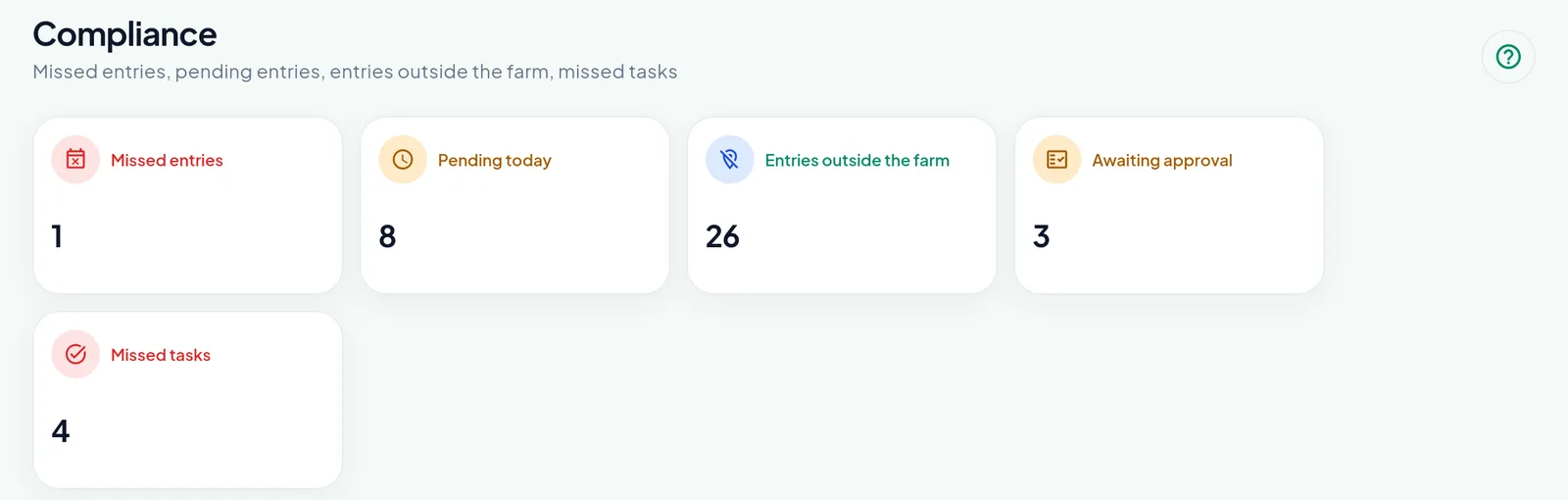
Five tiles, each with its list below. The three entries awaiting approval are the three alerts on the phone.
Each tile answers one question:
- Missed entries: open batches with no entry for a past day.
- Pending today: batches with no entry yet today.
- Entries outside the farm: entries saved away from the farm, by the position of the phone against the farm and its radius.
- Awaiting approval: entries that wait, when the setting is on. A click on a row and Approve does the same as the button in the app.
- Missed tasks: tasks whose due day passed without being done.
Below the tiles, the lists name the people. The one missed entry is BR-F05-26-005 on More Farm: supervisor Nilesh Shelke, last entry on 21 October, day 15. The eight batches pending today each carry their farmer, supervisor and manager, so the call to make is obvious. A row opens its batch.
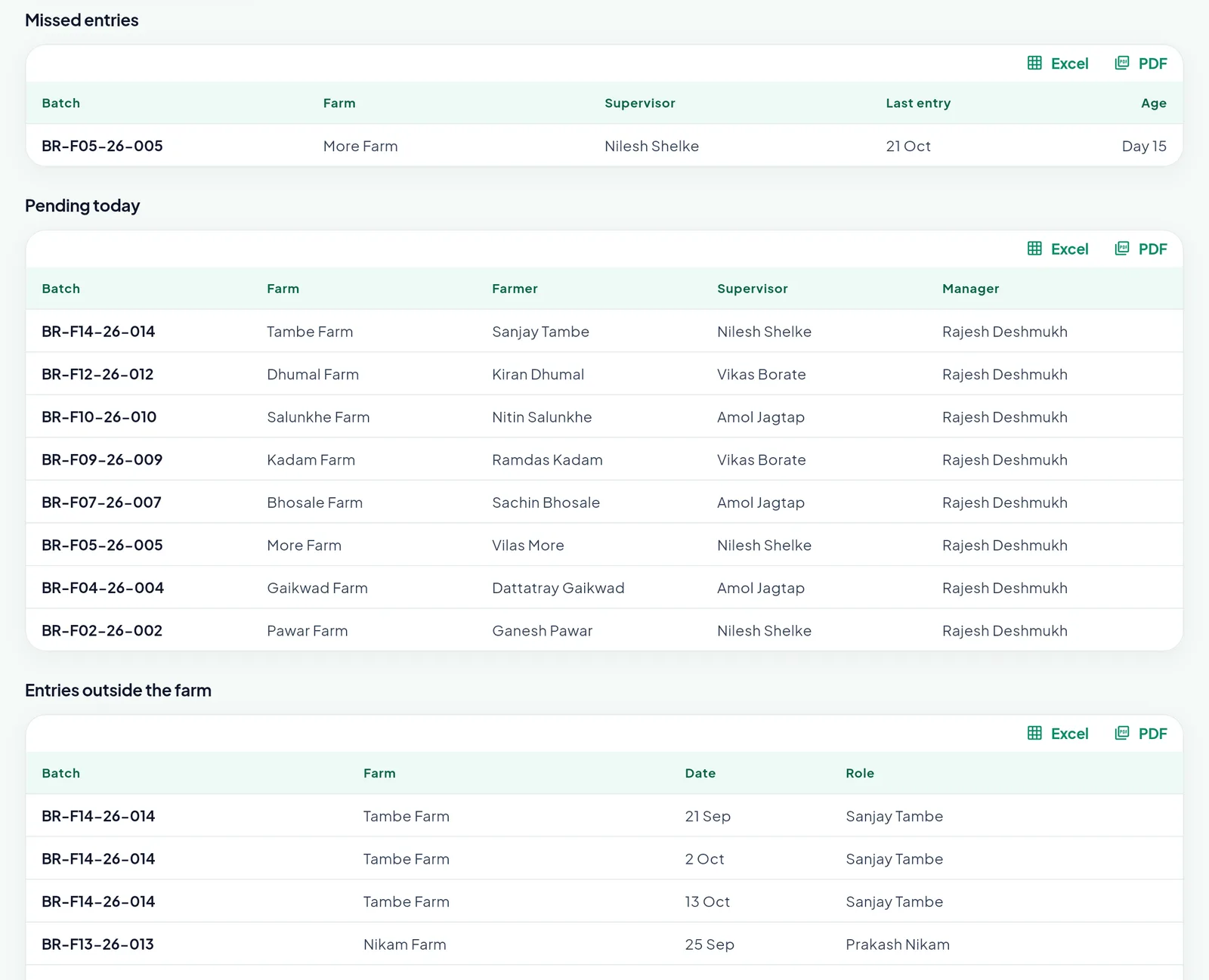
Pending today is not a failure yet. The missed-entry alert goes out only after the organisation’s cut-off time.
The 26 entries outside the farm are worth reading slowly. Three of them are on Tambe Farm, all entered by the farmer, Sanjay Tambe, on 21 September, 2 October and 13 October. That is a pattern, that no paper register shows. With the block off, those entries still count; the owner decides whether to talk to the farmer, set a larger radius for that farm, or switch the block on.
Missed tasks and the days of the users
Compliance is about the work around the entry too. The missed tasks tile counts the scheduled jobs that passed their due day. On the Tasks page the four are plain: a water tank cleaning at Shree Agro Unit 1, seven days late; an ND Lasota vaccine at Kadam Farm, five days late; a shed fence check at Thorat Farm, four days late; a feed stock count at Kale Farm, one day late.
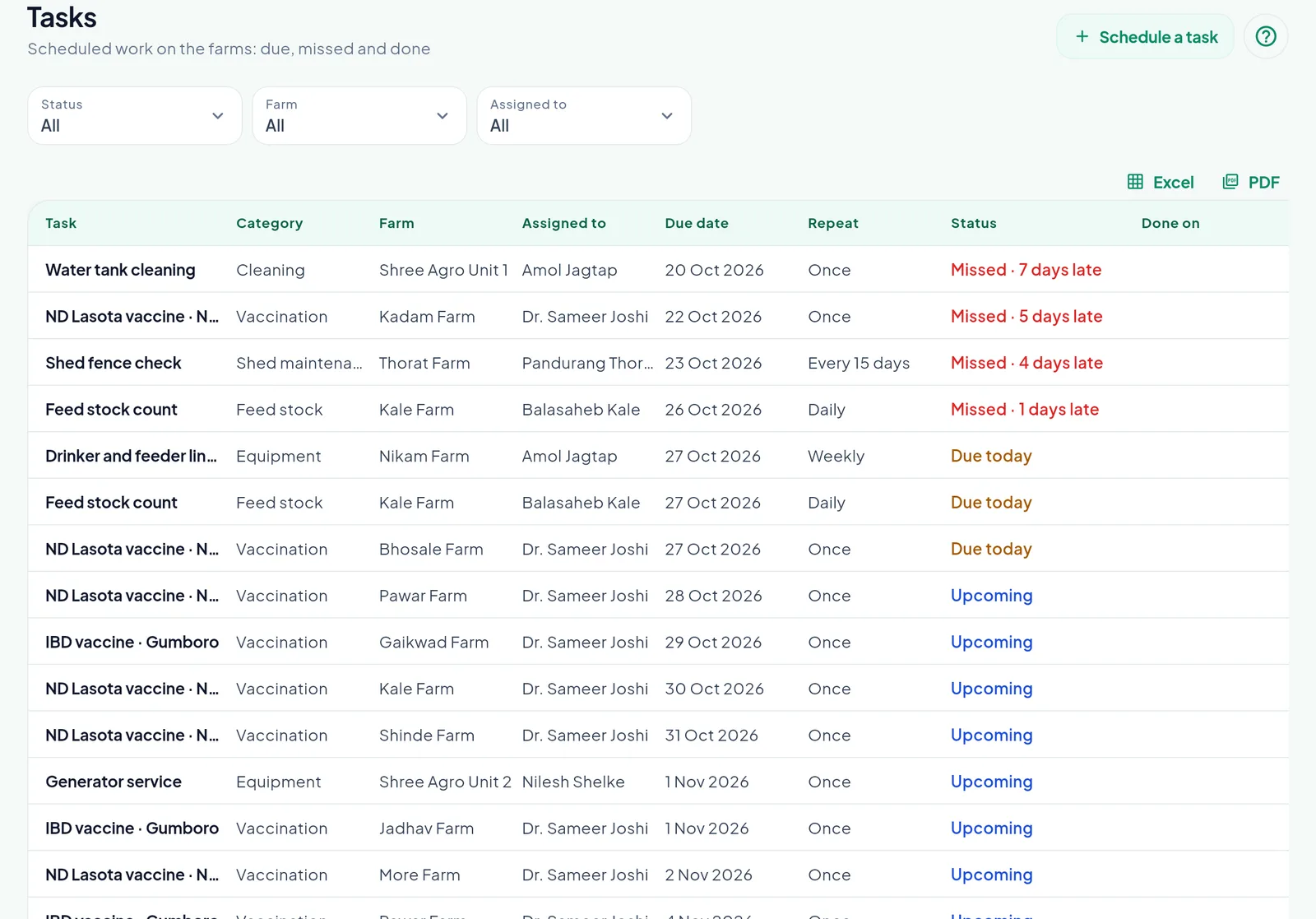
A missed task sends an alert to its assignee and to the Owner and the Manager.
The last block of Compliance lists the days of the users for the last two weeks: when each one started and ended the day, the kilometres and the travel. The travel itself is another thing that waits. At End day, the kilometres times the rate of the user’s vehicle are booked as a Travel expense, spread over the batches the user entered that day, and it waits for the Owner or a Manager. On 26 October Amol’s 91.5 km became an expense of ₹366, split over two batches, awaiting approval.
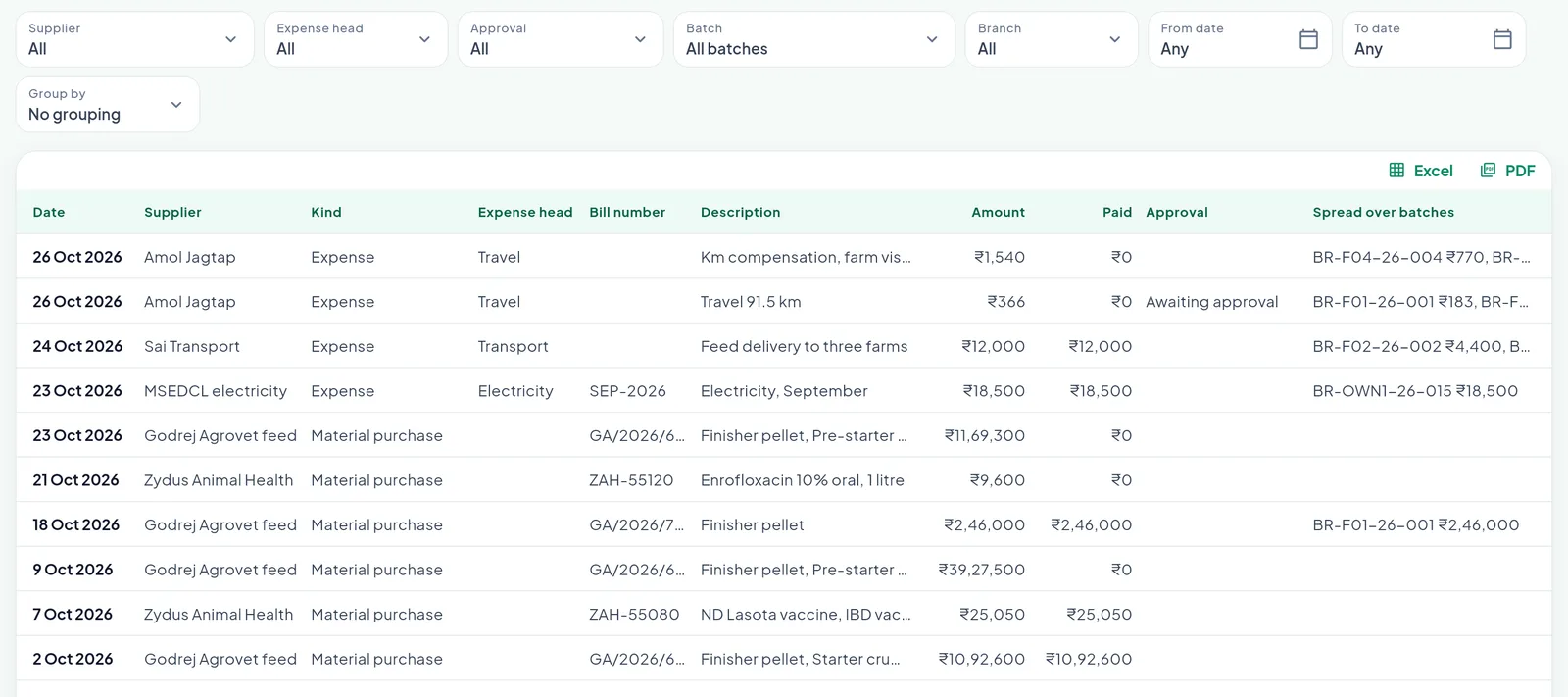
A click on the row approves it. Until then it counts in no batch cost, P&L or costing report.
The manager, not just the owner
Approvals only work if they do not all land on one person. In PoultryOS the Manager carries the same control pages as the Owner: the home with every batch, the approvals, the tasks, Compliance. What the Manager does not have is the Financial page, the token purchase and the right to change the settings.
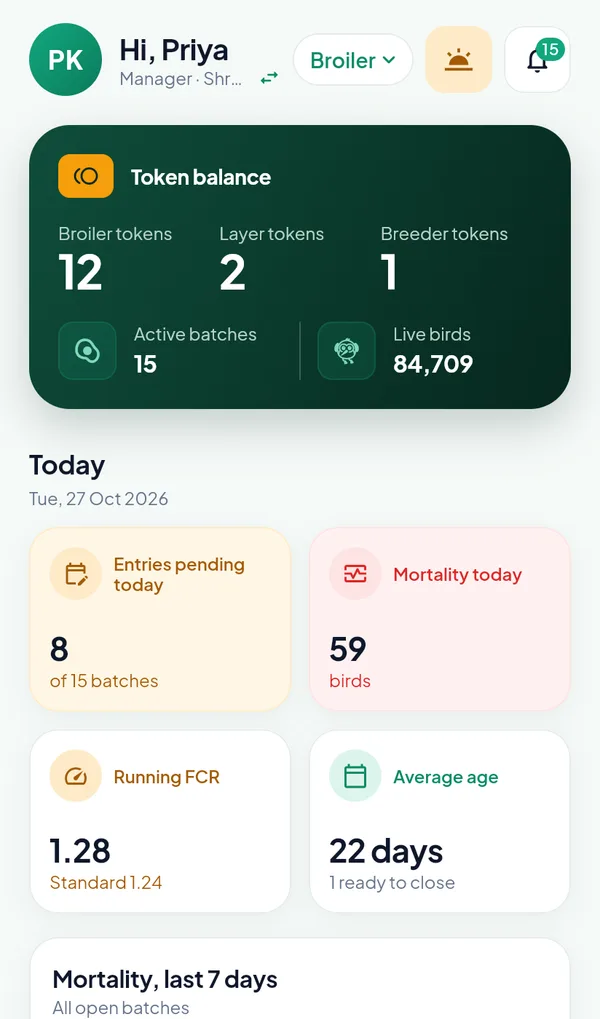
Priya sees the whole organisation, with the same fifteen alerts as the owner.
Layer and Breeder follow the same rules
A Layer or Breeder flock is entered per shed, and every rule of the Broiler entry applies to each shed day: the edit window, the approval, the change record and the position of the phone. A flock day is approved only when every one of its sheds is. In the sample, Sunrise Layers runs without approval, and its Compliance page says so instead of showing a zero that could be misread.
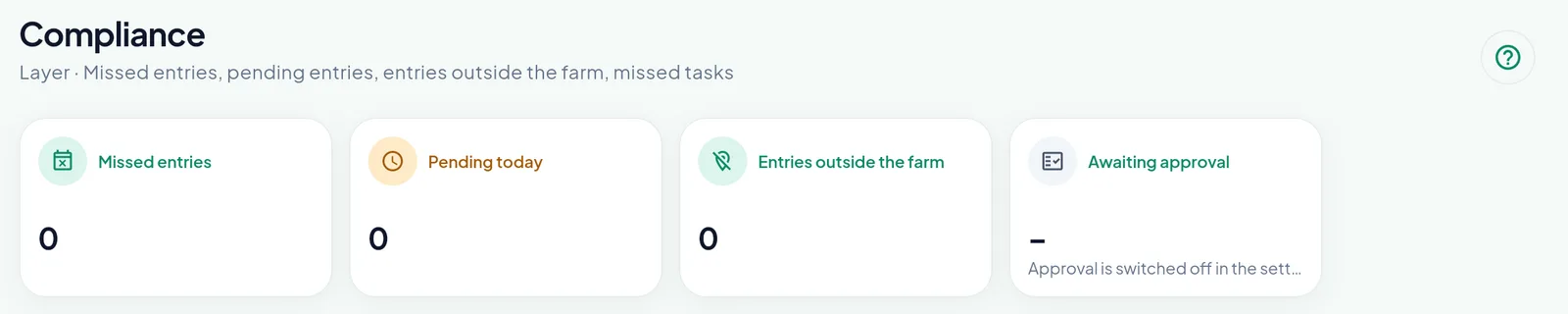
With approval off, the tile shows a dash and the reason, not a misleading zero.
What we chose not to do
We could have made approval a hard gate: nothing counts until a manager signs. In practice that turns the manager into a bottleneck and the owner’s dashboard into yesterday’s news. We could also have let anybody edit anything forever, which is why a spreadsheet is never trusted at settlement. The edit window sits between the two. The farm can fix a typo while the shed is still in memory; after three days the record belongs to the people who will settle it, and every change is on record either way. That matters most at the end of a contract batch, when the growing charge statement is built from exactly these entries.
Frequently asked questions
Whose entries wait for approval? With the setting “Daily entry approval required” on, the entries of a Supervisor and of a Contract Farmer wait. The entries of the Owner and the Manager are approved at once. With the setting off, nothing waits and the Awaiting approval tile says so.
Who can approve an entry? The Owner or a Manager approves any entry, on the Days tab of the batch in the app or on the Compliance page of the portal. A Supervisor approves the entries of a contract farmer.
Do the figures of a waiting entry count? Yes. The figures count in the KPIs, the dashboard and the batch tiles at once, so the owner never looks at yesterday’s numbers. The day register marks the days that still wait.
What is the edit window? The number of days the people of the farm may still change an entry, three by default, set by the Owner on the Configuration tab of the Settings. After that only the Owner or a Manager can change it. Every change keeps who made it, when, and each figure before and after.
Can I block entries made away from the farm? Yes. “Block entries outside the geofence” refuses a save from outside the farm radius, 500 metres by default, which a farm can override. With the block off, the entry is saved and marked Outside the farm, and it appears on the Compliance page.
Set the rules for your own farms
Every organisation draws the line between trust and checking in a different place. Poultry management software that only records the day leaves that line to habit; a poultry ERP lets the owner set it once for every farm. Book a demo and we will switch approval on in a sandbox organisation, let one of your supervisors enter a day, and walk your manager through approving it on the phone and on Compliance. The Contract Broiler Farming (CBF) Software module page shows what these entries feed, from the farm league to the branch P&L, and the platform features page covers the roles and approvals around them.