Placement to lifting: wizard, standards, feed
How a broiler batch is placed in the PoultryOS app in five steps, what the standard chart of the breed sets for the rest of its life, how the feed of the day is suggested, and how the batch ends at the weighbridge.
PoultryOS Team · Product and implementation team
A broiler batch is decided in the first ten minutes. The breed, the chicks that really arrived, the feed rate, the sale rate the batch is planned on, the chart it will be measured against, and the people who will walk the shed are all fixed at placement, and every figure for the next five weeks reads from them. In contract broiler farming that matters twice, because the farmer’s growing charge is worked out from the same figures. PoultryOS, a poultry ERP built around the batch, puts the whole placement into one wizard on the phone, so the batch starts complete instead of being filled in at the branch a week later.
This post follows one placement through its five steps in the sample organisation, Shree Agro Integration, then shows what the standard chart does for the rest of the batch, from the feed suggested each day to the lifting bill at the weighbridge.
Step 1: the farm
The owner taps the round + on the home screen and picks Place batch. The first step lists the farms with their place and capacity. A farm holds one open batch at a time, so every farm with an open batch is greyed out and marked Open batch; only a free farm can be tapped. A farm with no shed is refused.
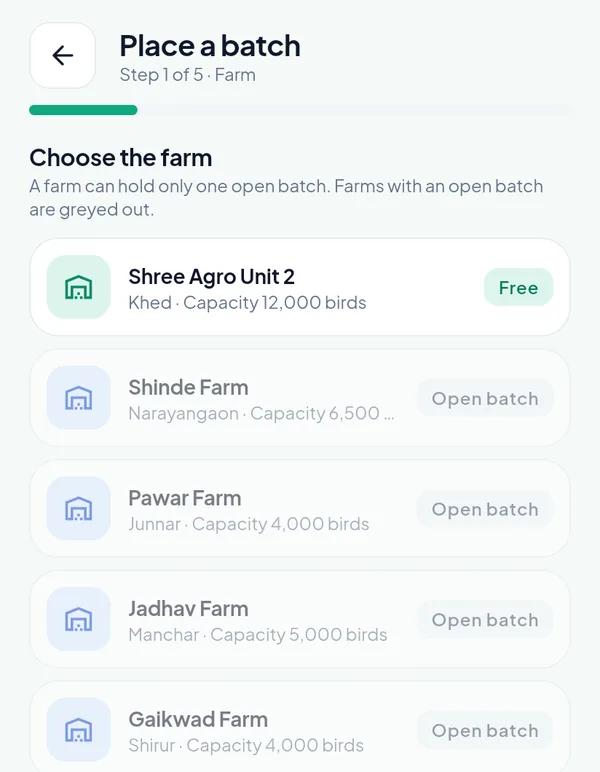
Step 1 of 5. Of the farms on this screen only Shree Agro Unit 2 at Khed is free; the others carry an open batch.
Step 2: the chicks that really arrived
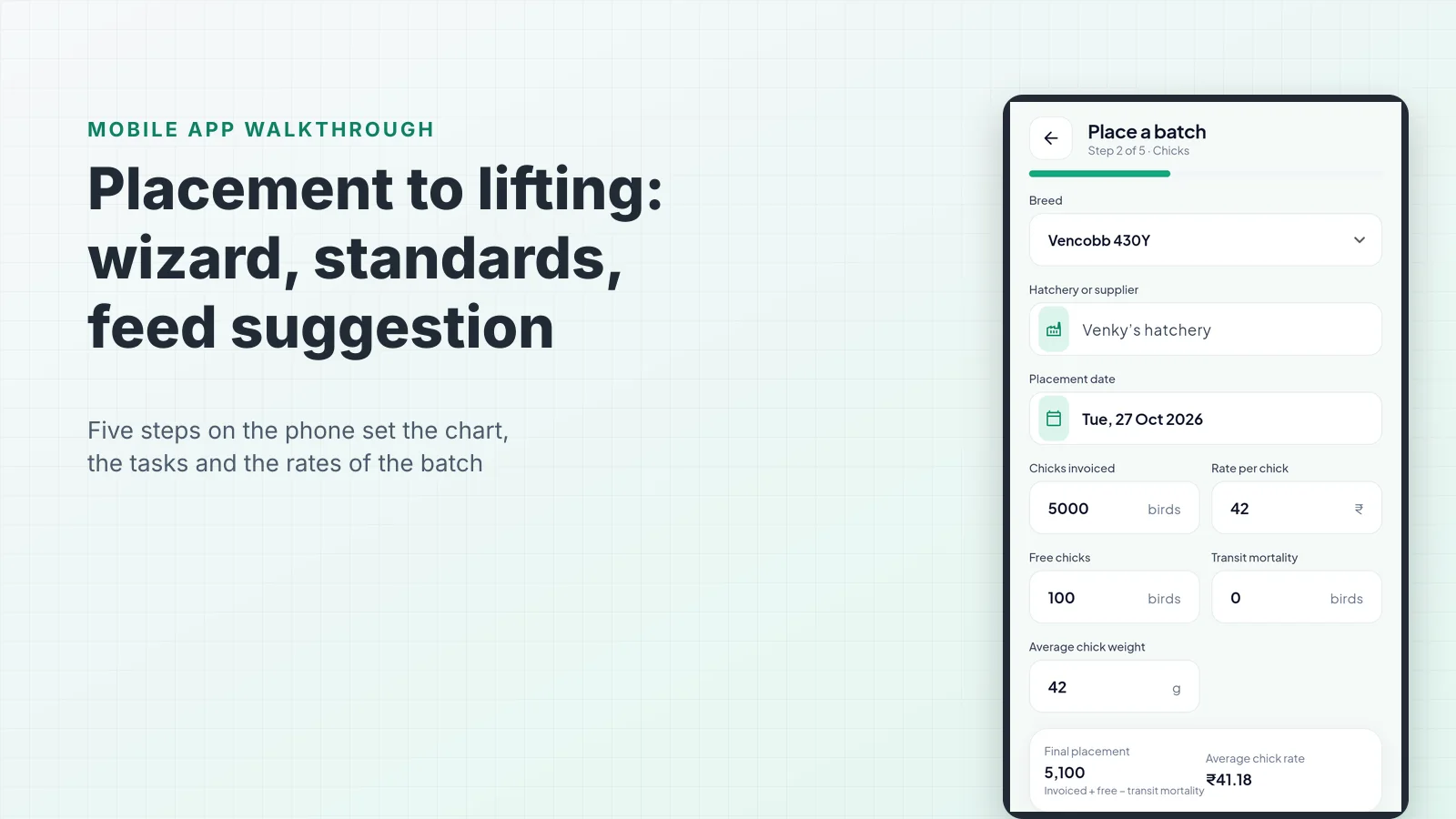
The second step is the chick invoice as it reaches the farm: the breed, the hatchery or supplier, the placement date, the chicks invoiced and their rate, the free chicks, the birds dead in transit and the average chick weight. The card at the bottom works out the two numbers everything else depends on. The final placement is invoiced plus free minus transit mortality. The average chick rate spreads the invoice over every chick placed, free ones included.
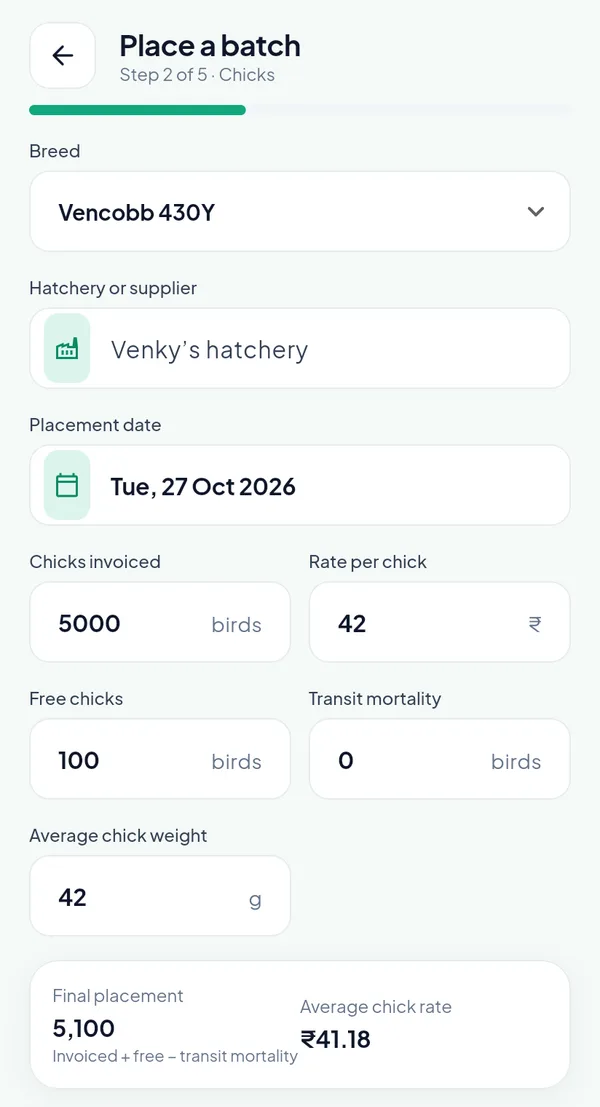
5,000 chicks invoiced at ₹42 with 100 free gives 5,100 birds placed at ₹41.18 a chick. The ₹2,10,000 of the invoice is spread over the 5,100.
The placement date cannot be in the future. It can be earlier, within the back-dating limit the platform sets for each module, so a farm that joins mid-batch places it on its real date and types its days.
Step 3: the rates and the break-even
The third step asks three planned figures: the feed rate per kg, the planned sale rate per kg live and the target age at sale. The app fills in the defaults the owner keeps on the portal. Under them a dark card shows the break-even rate and the projected margin at the standard of the breed.
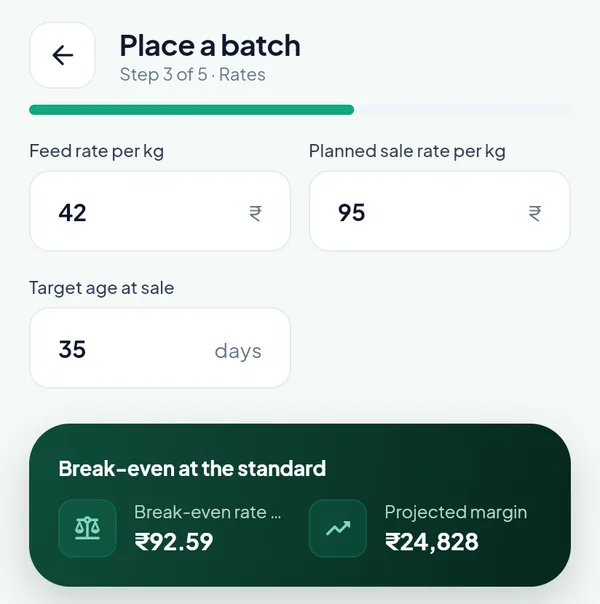
At a feed rate of ₹42 and a planned sale at ₹95, the break-even is ₹92.59 a kg and the projected margin ₹24,828.
The card uses the formula of the free break-even calculator, with the standard of the breed filling in the liveability, weight and FCR at the target age. Drop the planned sale rate below the break-even and the margin turns negative before the chicks have drunk their first water. The same rate later values the forecast of the batch P&L, and the target age is the “of 35” on the batch screen.
Step 4: the standard chart, the vaccination schedule and the people
The fourth step is the one that sets the life of the batch. At the top sits the standard chart of the breed, here the Vencobb 430Y demo chart, version 1, 49 days long. The owner keeps the chart offered or picks another version of the breed.
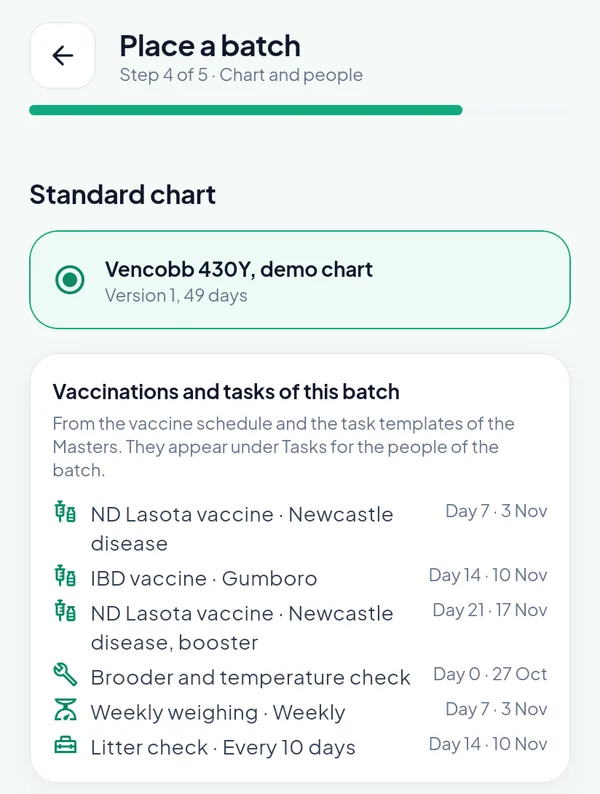
The work of the batch, with its dates, before the batch exists: Newcastle disease on day 7 (3 November), Gumboro on day 14, the Newcastle booster on day 21.
Below the chart comes the list Vaccinations and tasks of this batch. It comes from two masters: the vaccine schedule (on this day of age, this vaccine, dose, route and purpose) and the task templates (this task, from this day, once or repeating, photo or not, done by which role). Placing the batch turns every active line into a dated task, so the supervisor finds the brooder check on day 0, the weighing every seven days and the litter check every ten days under Tasks in the app, and a missed one shows on the Compliance page of the portal. To see the dates a single placement date gives, try the free broiler vaccination schedule and flock calendar: it works out the vaccination days, feed changes, weighing days and lifting window.
The last part of the step names the people. The supervisor of the farm is proposed; the manager and the vet are optional.
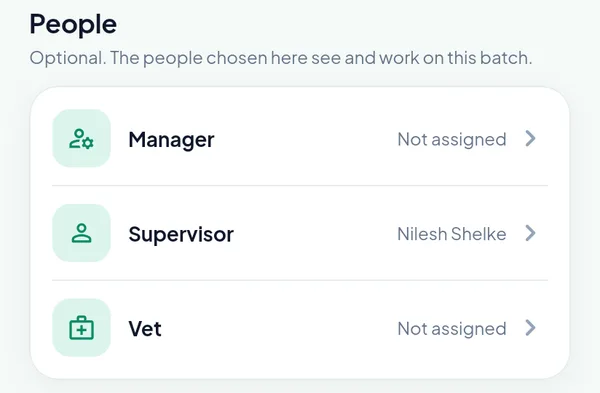
The supervisor of the farm is proposed. Access in PoultryOS is by batch, so the people chosen here are the people who see it in their app.
On a contract farm this step also asks for the growing charge scheme of the batch; without a choice the first active scheme is taken. Shree Agro Unit 2 is an own farm, so the question does not appear.
Step 5: review and place
The last step shows every figure of the batch on one page, with the token it will use. One token places one batch, and the note says what the balance will be afterwards. When the organisation holds a trial token of the module, two chips choose between the trial and a bought token.
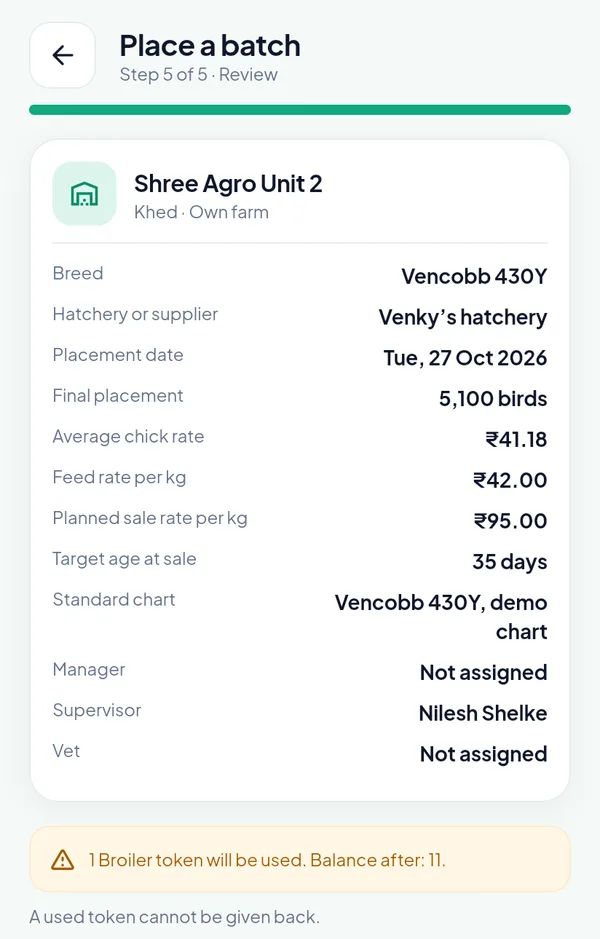
The review. “1 Broiler token will be used. Balance after: 11.” A used token is not given back.
Confirm and place creates the batch with a number made of the module, the farm code, the year and a sequence, such as BR-F01-26-001. The tasks of the batch appear on their days, and the batch is on the owner portal a moment later.
The standard chart: a broiler weight and feed chart by day
The chart chosen at step 4 is a table with one row per day of age: body weight, feed of the day, feed to date, FCR, mortality to date and the feed stage. On the Chart upload page of the owner portal the owner downloads it as Excel, changes it and uploads it again, changes single days in the Masters, or takes the newest base chart of the platform with one button. The file is read in the browser and every row is checked; a file with a problem cannot be saved.
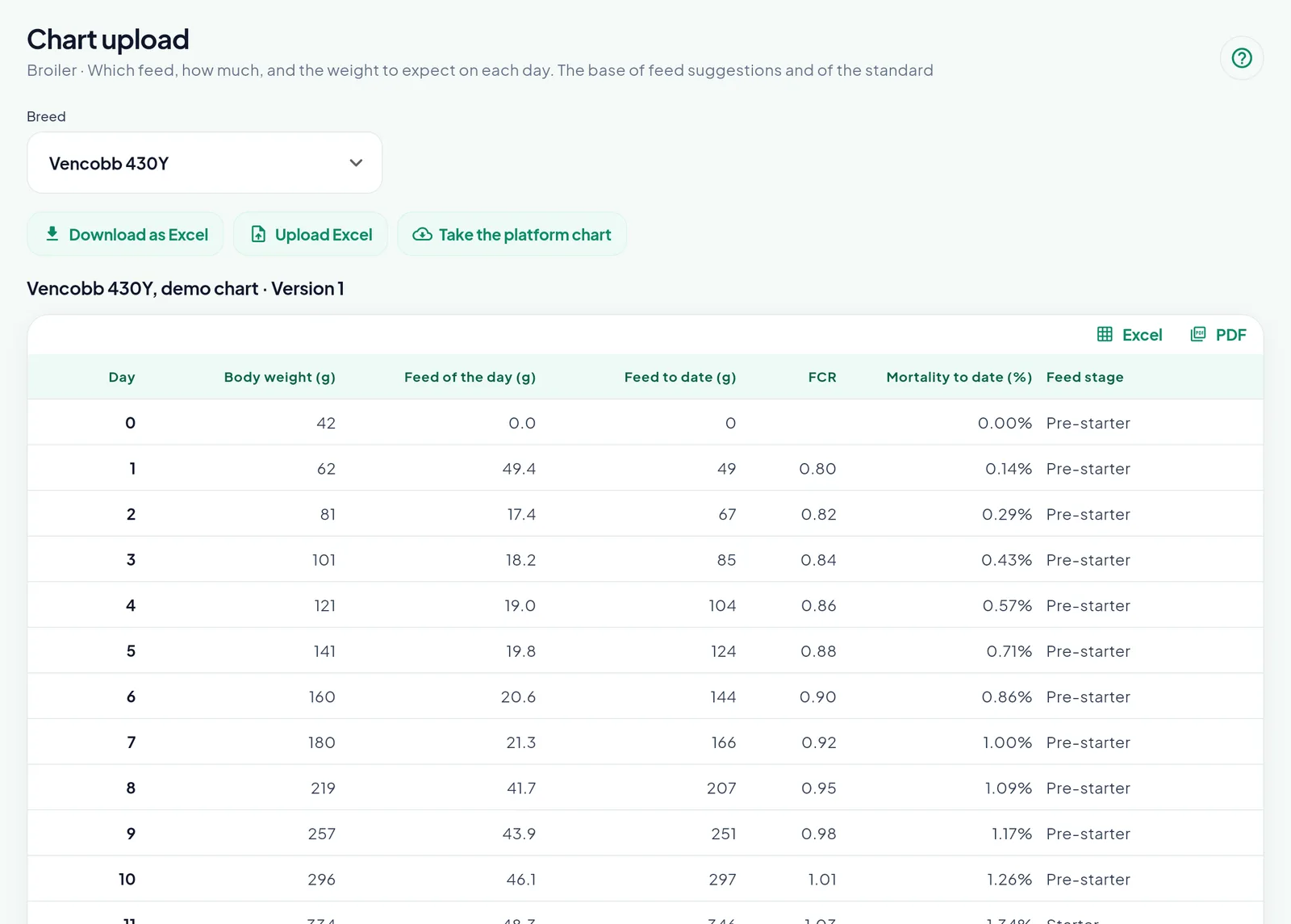
Day 0 at 42 g, day 7 at 180 g and 1.00 % mortality to date, day 10 at 296 g with 297 g of feed eaten. The first eleven days are Pre-starter.
Each save is a new version, and this is the rule that keeps the comparisons honest: a batch keeps the version it was placed with; a new batch starts with the newest. An owner who tightens the chart in December does not make every batch placed in November look worse overnight.
The feed of the day, suggested
Every row of the chart carries a feed stage: Pre-starter, Starter, Grower, Finisher 1 or Finisher 2. The daily entry reads the age of the batch, finds the stage of that day on the chart, and suggests the organisation’s feed of that stage. If the organisation has no feed of that stage, it takes the nearest stage it has, the earlier one on a tie. Under the bags it shows the feed to expect for the day, and with the stock ledger on, the feed on the farm.
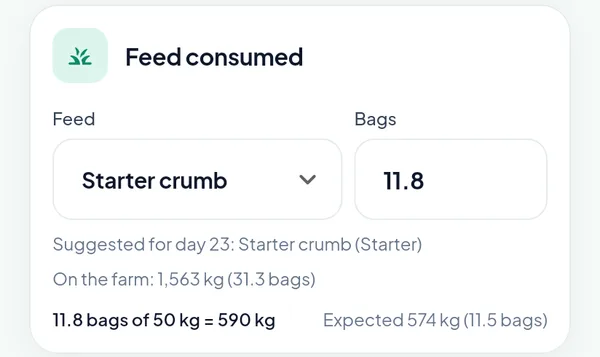
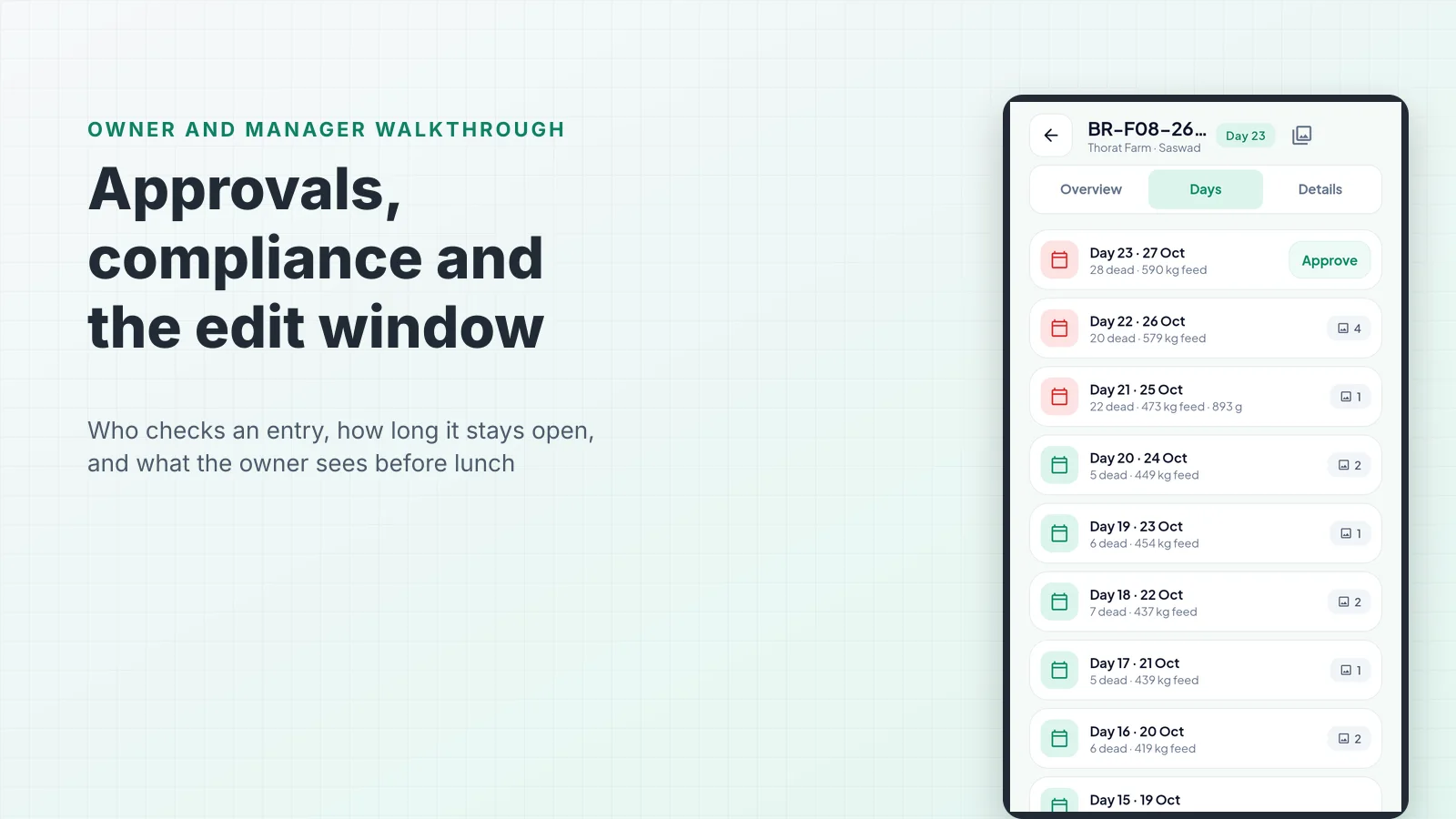
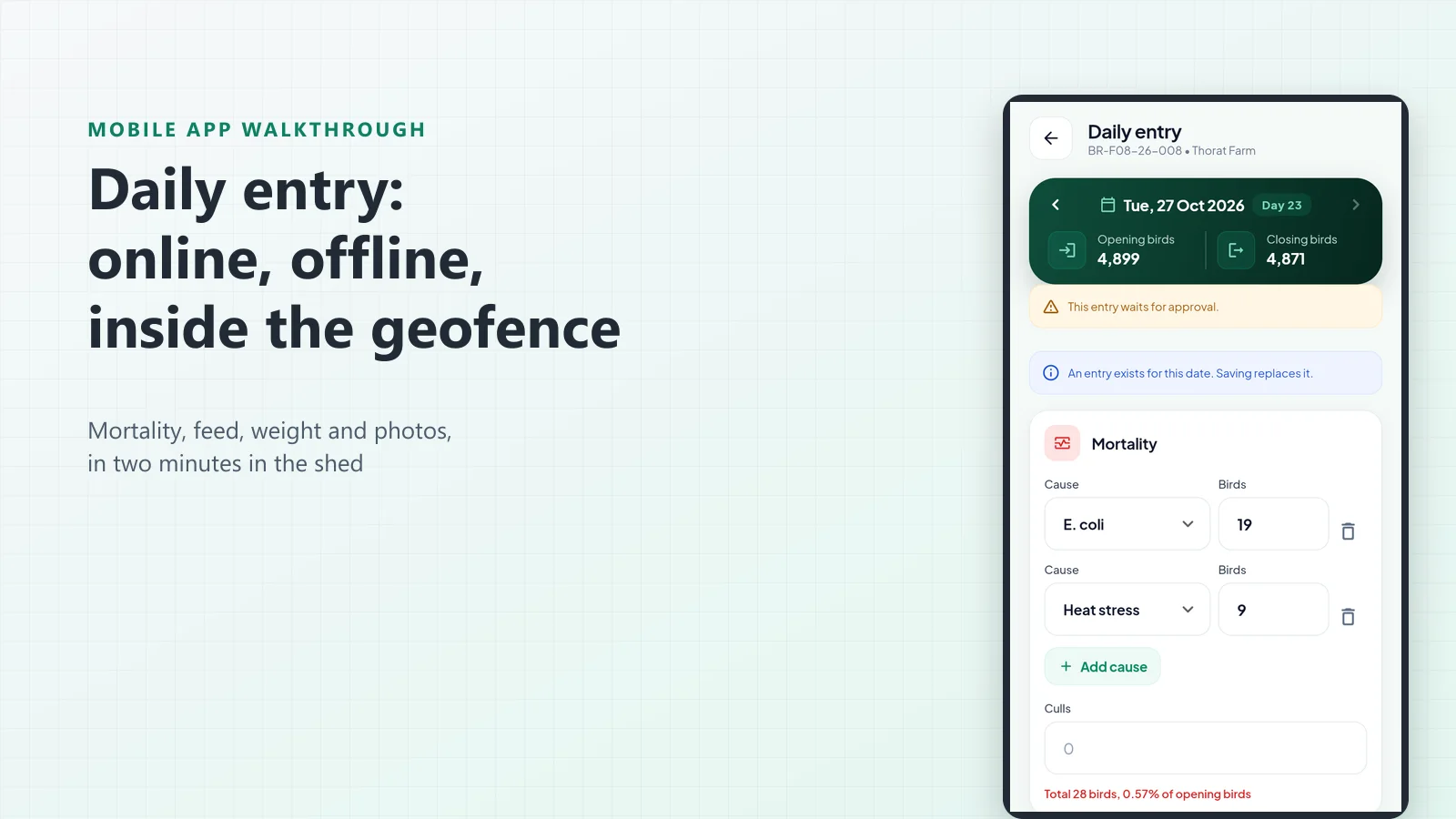
On day 23 of another batch in the sample organisation: 590 kg entered against 574 kg expected by the chart.
It is a suggestion only; any feed may be entered. The chart’s quantity next to the supervisor’s own is usually enough to catch a feed change made a week late.
From placement to lifting: what the batch carries
Once placed, the batch measures itself against its chart every day. The batch screen of the app shows the live birds and the day of the target age, then mortality, running FCR, weight and CFCR with the EPEF, each next to the standard of the same day, in green, amber or red.
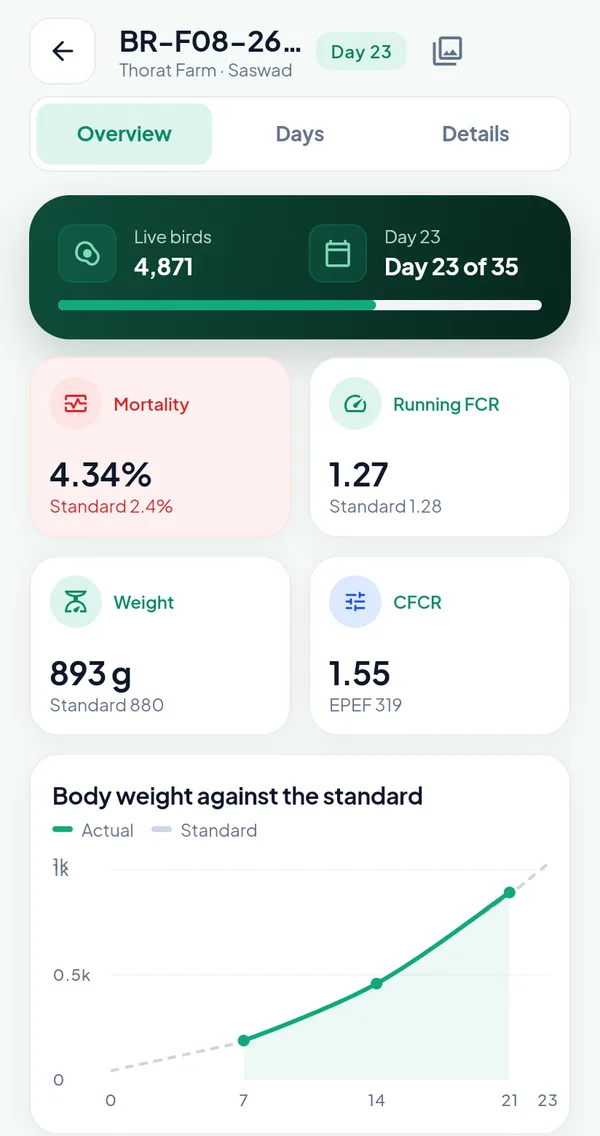
Day 23 of 35 at Thorat Farm. Weight and FCR are on the standard; mortality at 4.34 % against 2.4 % is red.
Lifting is the other end of the same record. A batch is sold with one bill per lifting: the customer, the date, the vehicle, the birds, the gross and tare weight from the weighbridge, the rate per kg and the photo of the weighbridge slip. The net weight and the amount are worked out, and the live birds on the book sit at the top of the form.
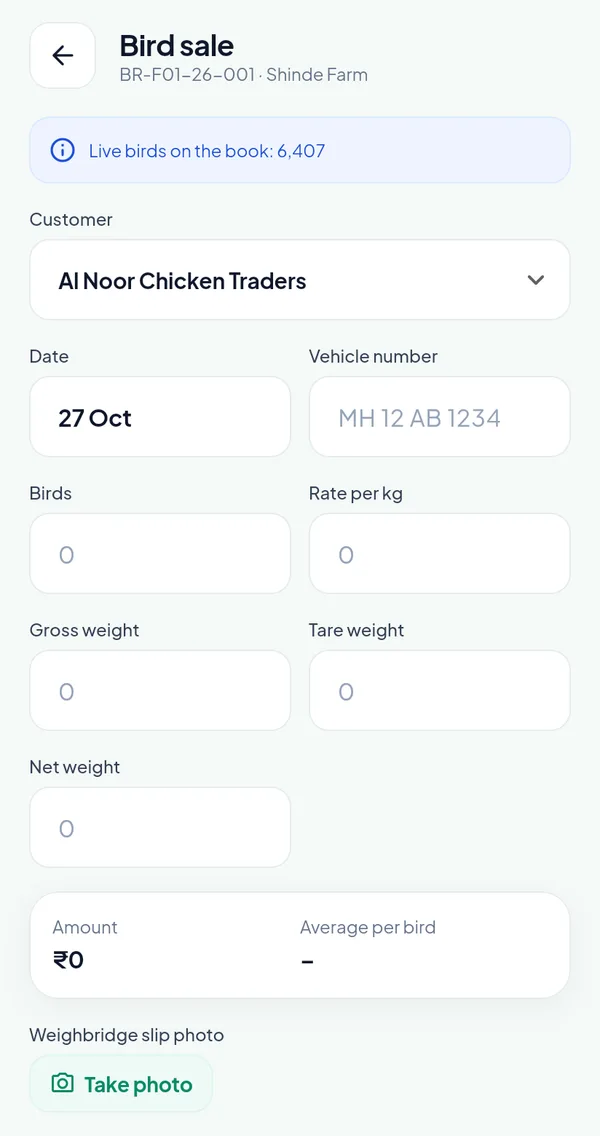
One bill per lifting. 6,407 live birds remain on the book of this batch; a bill above them is warned within the excess tolerance (2 % here) and refused beyond it.
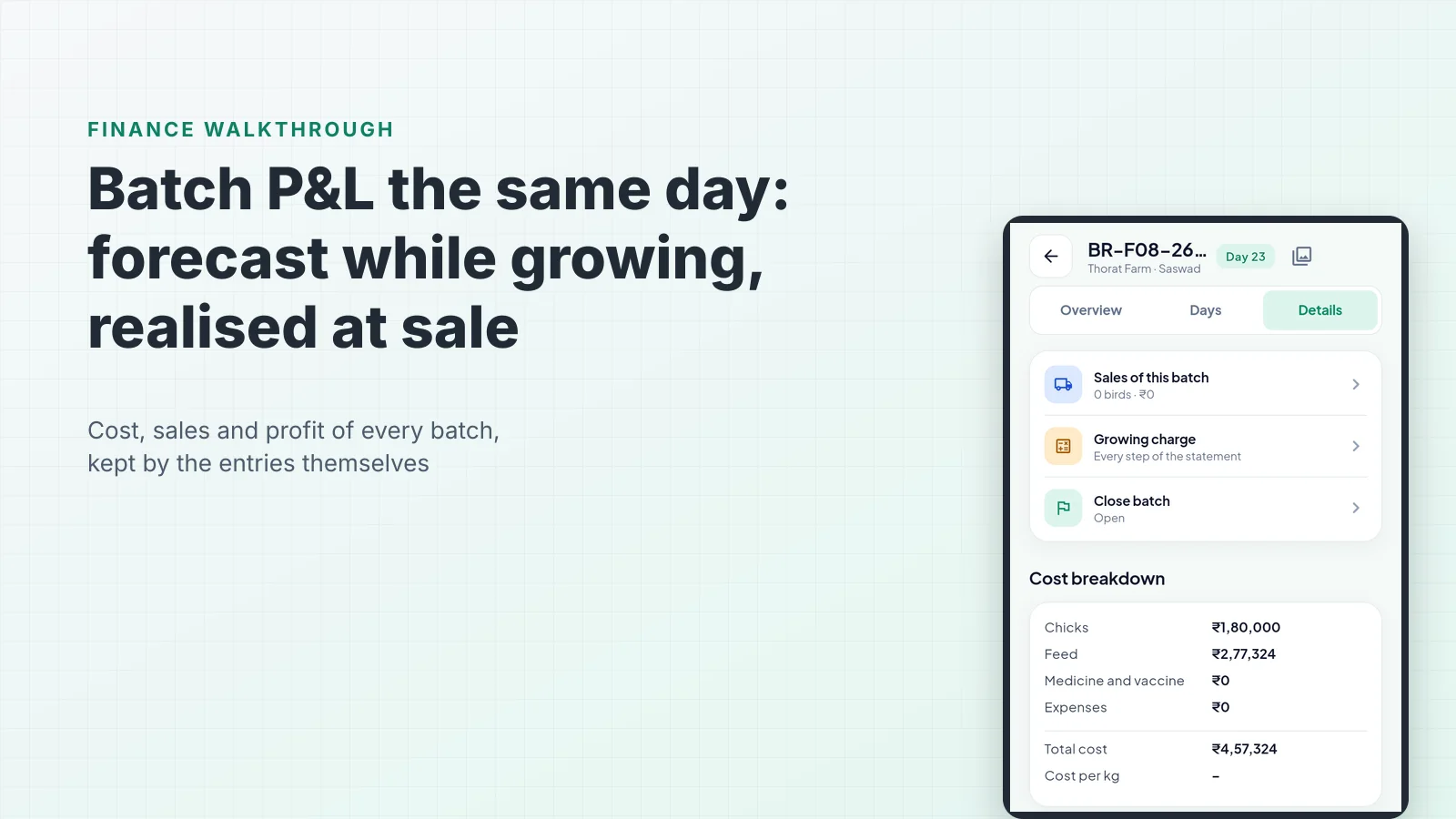
When the last bird is lifted, the closure moves forward in steps that never go back: sales complete, stock cleared, then for a contract farm the growing charge approved and the farmer paid, and closed. The farm is then free for its next placement, and the wizard starts again at step 1.
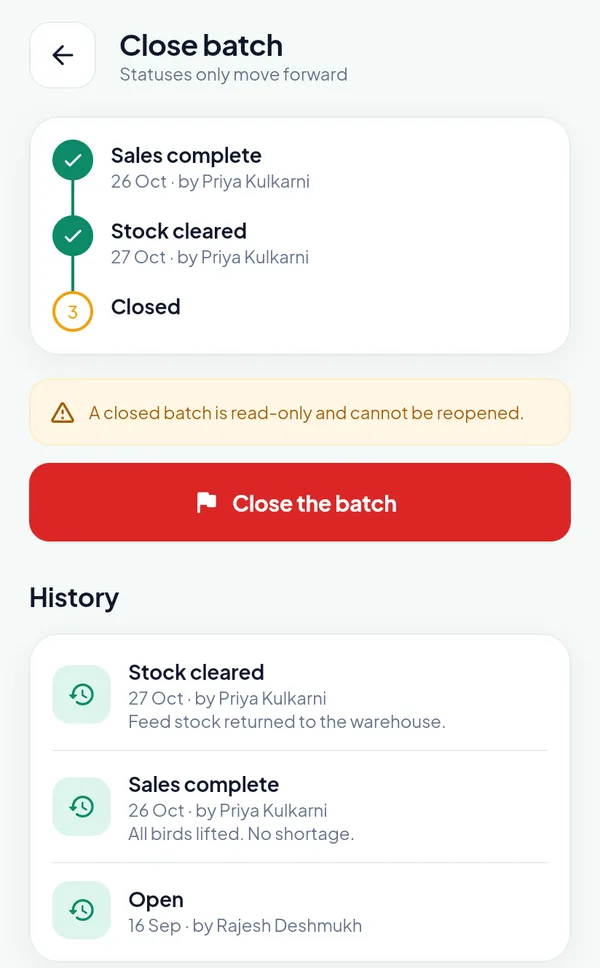
An own-farm batch placed on 16 September: all birds lifted on 26 October, the feed returned to the warehouse the next day.
Why the placement carries so much
Much of what goes wrong in a batch is decided before day 1: a transit loss nobody recorded, an old feed rate, the wrong chart, a vaccination nobody planned. The wizard asks for each once, with the invoice in hand, and every entry, alert, costing and growing charge statement then reads from the same record. That is the difference between poultry management software that records the days of a batch and one that knows from the first day what the batch should look like.
Frequently asked questions
Can a batch be placed on an earlier date? Yes, within the back-dating limit of the module. The placement date cannot be in the future, and the server checks the limit as well as the date picker, so a running batch can be placed on its real date and its past days entered.
What happens to an open batch when the owner changes the standard chart? Nothing. Each save of a chart is a new version, and a batch keeps the version it was placed with. A batch placed after the change starts with the newest version.
Does the app force the supervisor to use the suggested feed? No. The daily entry suggests the feed of the stage of the day and shows the feed to expect from the chart, but any feed may be entered. With the stock ledger on, the entry is checked against the feed on the farm, refused or allowed into negative stock as the Settings say.
Where do the vaccinations and tasks of a new batch come from? From the vaccine schedule and the task templates in the Masters. Placing the batch creates them with their dates, and the chart step of the wizard lists them before the batch is confirmed. A changed schedule counts for batches placed after it.
How many birds can a lifting bill hold? A few more than the live birds on the book, within the excess tolerance the organisation sets (2 % in the sample organisation). The app warns, books the extra birds as excess to be confirmed at Sales complete, and refuses a bill beyond the tolerance, so a miscount at the farm gate is caught on the bill.
What is a broiler standard chart? A table with one row per day of age that gives what the breed should reach on that day: body weight, feed of the day, feed to date, FCR, mortality to date and the feed stage. It is the broiler weight and feed chart of the batch. PoultryOS compares every daily entry with the row of the same day and suggests the feed of that day’s stage.
Place a batch on your own farm
The quickest way to judge a placement screen is to place a batch with it. Book a demo and we will set up a sandbox organisation with one of your farms and your breed’s chart, so your branch manager can run the five steps in the poultry farm app on a phone. The Contract Broiler Farming (CBF) Software module page shows the rest of the batch cycle, and the earlier posts cover the daily entry on the phone and the batch P&L the same day that this placement feeds.